




The Best Dimming Controls System
Compare rotary, push-button, wireless and smart dimming systems for your project.
Read moreTap a scene to see how a single scene keypad transforms the same living room. One master photograph is re-lit live — each scene dims the room to its own exposure and reveals just the right circuits — then dim it to taste, or fade the whole room to black with master-off.
Tap a scene · dim to taste
Scene 01 — 04
The room as you live in it — daylight and every circuit up: cove, shelves, downlights, pendant and lamp all on.
Most rooms have one switch and one "look". But the way you want a kitchen to feel at 7am — bright, cool, wide awake — is nothing like the way you want it at 8pm. Scene setting is the technique that lets a single keypad hold both of those moods, and several more, recalling each one at the touch of a button. This guide explains what scene setting is, how it works, and how Wise Controls scene products make it achievable in any home — no rewiring, no hub and no Wi-Fi required.
Scene setting is the ability to control more than one lighting circuit at the same time, storing a specific brightness level for each circuit as a single scene. Instead of reaching for four separate dimmers — pendants, downlights, accent spots and an LED cove — you press one button and the whole room shifts to a complete, pre-set lighting state.
It sits a step above ordinary dimming. A rotary dimmer controls one circuit at one position. Two-way and multi-way dimming lets you dim that circuit from several positions. Scene setting goes further again: it remembers the levels of every circuit at once, so "dinner" or "movie night" becomes a single repeatable command rather than a fiddle with four controls every time.
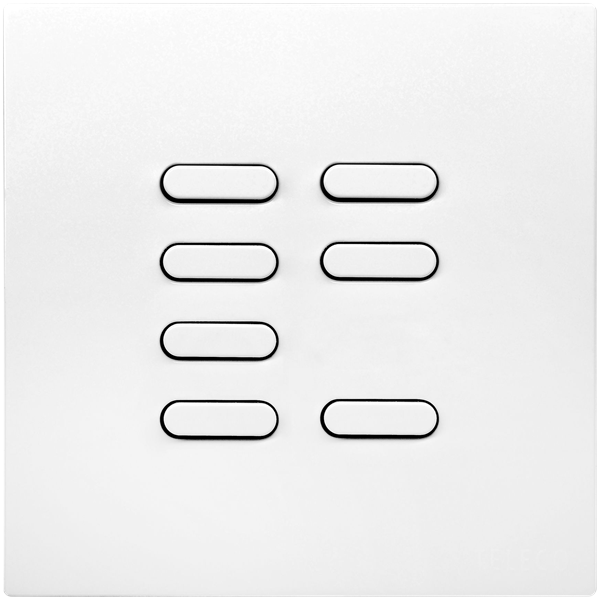
A scene controller usually stores four scenes on a seven-button keypad — four scene buttons plus raise, lower and off. The raise and lower keys fine-tune whichever scene is live, and a single press of off fades every circuit to black. That is usually all a room needs to go from a tangle of switches to a single, calm control plate.
The appeal is partly atmosphere and partly sheer simplicity. A few reasons it tends to win people over:
Wise Controls is a British-made wireless lighting system, and it's the range we most often specify for scene setting. Because it works over radio rather than fixed wiring, you can add keypads anywhere and store scenes without chasing walls. Here's how the pieces fit together.
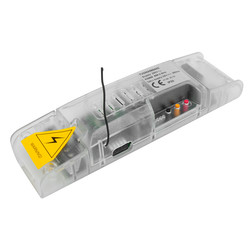
The scene box is the multi-channel receiver that does the real work — a dimmer pack that stores full lighting moods, not just on/off states. It holds the brightness level of every circuit it controls and fires them together when a scene is recalled. This is the heart of any scene-setting install.
 Wise Scene Box Kit — Keypad & Key Fob
 Wise Scene Box Receiver
 Scene Box, Keypad, Keyfob & Mouse Dimmer Kit
The keypad is what you actually touch. Battery-powered and fully wireless, Wise keypads fix to any wall surface without a back box — perfect for retrofits, listed buildings and "I wish there were a switch here" moments. Programme each button to a scene, and add as many slave keypads to the same room as you like.
Browse Wireless KeypadsWhere space is tight, scene receiver packs are compact enough to sit in a ceiling void or even inside a downlight hole. They give you scene-setting control circuit by circuit, paired to whichever keypad or remote you choose — a neat way to add scenes to an existing scheme.
Browse Scene Receiver PacksScenes work perfectly on their own, but if you want to recall them by voice or from your phone, the Wise Daisy Wi-Fi interface bridges the system to your router. Your physical keypads keep working exactly as before — voice and app simply become extra ways to fire the same stored scenes.
Browse Wise Daisy Wi-FiSetting up a scene is refreshingly straightforward — there's no app to configure, no hub to install and no specialist software involved. The whole thing is done in the room itself, working with the light in front of you.
You simply adjust each circuit until the room looks exactly how you want it for a particular mood — pendants low, downlights off, the cove warm — and save that combination to a button on the keypad. From then on, a single tap recalls the whole arrangement, just as you left it. Set up the other buttons the same way, and the room has a complete set of moods ready at your fingertips.
Scenes aren't fixed once they're set, either. If your tastes change or the room gets used differently, any scene can be re-saved in moments — so the lighting keeps pace with how you actually live in the space. Our team can walk you through it, or set everything up for you as part of an install.
Scene setting pays back the spec time most in rooms that need to do several jobs through the day. Three that come up again and again:
One keypad at the island fires three preset moods through the day — cool and bright for breakfast prep, warm and low for evening dining, full output for the clean-down. Master-off on the way to bed. It's the single most popular place we specify scenes, and it pairs naturally with a layered kitchen island lighting scheme.
Pendants, table lamps, accent spots and an architectural wall wash are usually four separate switches. Scene setting puts every combination — entertain, relax, reading, movie night — on one tidy plate, and lets you layer the light without layering the controls.
Hotels, restaurants and bars run identical scene programming across every room or zone. Staff reset the room with a single press on entry; guests get a calm keypad rather than an app to learn. The same scenes drive a consistent, on-brand look from open to close.
A controller usually stores four scenes on a seven-button keypad — four scene buttons plus raise, lower and off. Add more keypads on the same wireless platform for more scenes — the controller stores the lighting state for each button it's paired to.
Yes — any scene can be re-saved whenever you like. Just adjust the lights to the new look you want and store it back to the same button. The new setting simply replaces the old one, so your moods can evolve with the room.
Yes. All scenes are held in non-volatile memory on the receiver, so they survive mains failures, internet outages and battery changes on the keypad.
Yes. Pair as many slave keypads as you need — every keypad in the zone can recall the same scene with a single tap, and any keypad can fire master-off.
Add a Wise Daisy Wi-Fi interface. Your existing keypads keep working in parallel; voice and app simply become extra ways to recall the same scenes.
Not sure scene setting is the right level of control for your project? Our guide to dimming controls compares rotary, push-button, wireless and full scene systems side by side.
Our technical team will work through the scene programming, keypad placement and circuit groupings for your project — residential, hospitality or commercial. Free of charge, and you'll talk to a specifier, not a sales line.

More lighting design guides from our team
 Smart Controls
Compare rotary, push-button, wireless and smart dimming systems for your project.
Read more Design Guide
Pendant trends, sizing, layering and the controls that tie an island scheme together.
Read more Technical Guide
Choosing the right Kelvin value transforms the atmosphere of any scene.
Read more